Midjourney Review: Image Generation Strengths, Video Workflow Gaps, and Alternatives
AI video tools are evolving fast, but many creators still rely on image models to support video workflows. Generating strong visuals is only part of the process.
Midjourney is widely used for images, yet its role in real video production is often misunderstood.
What Is Midjourney?
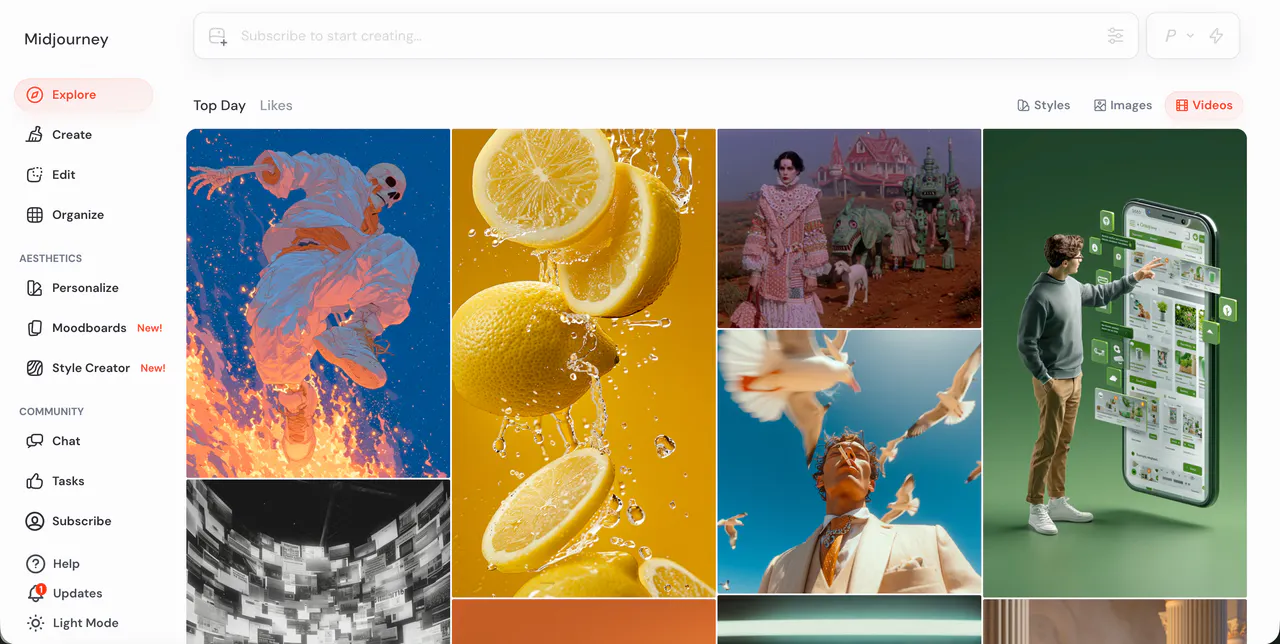
If you’re asking what is Midjourney, it is primarily an AI image generation tool. Midjourney AI is best known as a prompt‑based system that turns text descriptions into detailed images. It is often described as a midjourney ai image generator rather than a full video creation platform.
In practice, Midjourney is used for concept art, thumbnails, visual references, storyboards, and style frames. Many creators include Midjourney outputs in video workflows, but the tool itself does not function as a traditional video generator. There is no timeline, no shot sequencing, and no native way to assemble clips into a finished video. This distinction is important, especially for users expecting end‑to‑end video production.
Midjourney targets creators who value visual quality and artistic style over structured editing. That makes it powerful for ideation, but limiting for consistent or repeatable video output.
Features of Midjourney
Midjourney focuses on text‑to‑image generation, with tools for variation, upscaling, aspect ratio changes, and style exploration. Users refine results by adjusting prompts, rerolling generations, and selecting preferred variations. This workflow is flexible for experimentation, but it is also highly iterative.
From a video perspective, the limitations become clear quickly. Midjourney does not generate true video clips with motion continuity. Any sense of movement usually comes from exporting multiple images and animating them elsewhere. Maintaining character consistency across images is difficult, especially over longer sequences. Small prompt changes can alter faces, clothing, or environments, which breaks continuity in video projects.
There is also a learning curve. Effective results often depend on prompt structure and stylistic keywords, and reproducing the same look later can be unreliable. For creators who need predictable output, this trial‑and‑error approach can slow production and increase costs.
Pricing
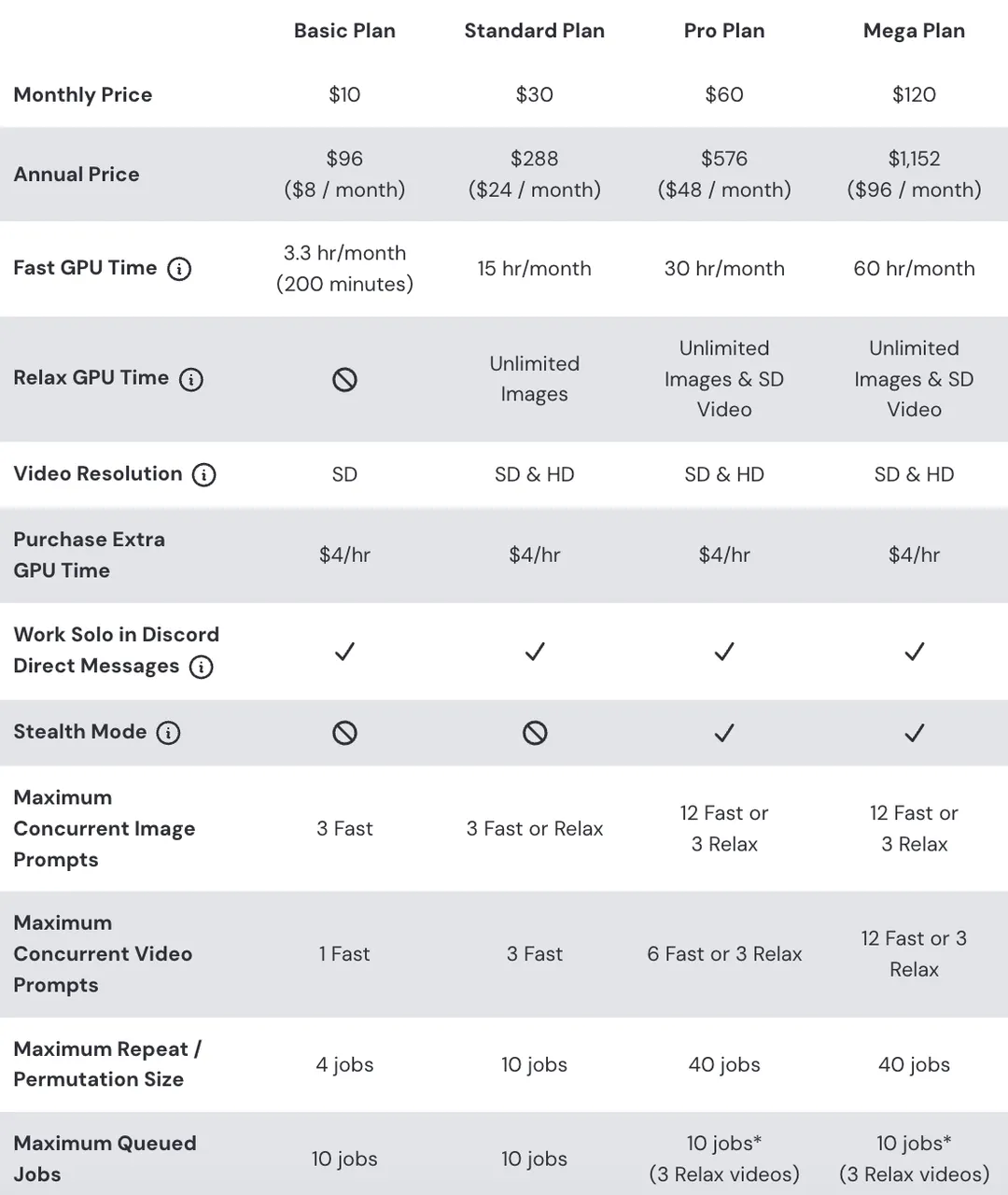
Midjourney offers four flexible subscription plans. Opting for Annual Billing provides a 20% discount on your total cost.
Pricing Summary (Monthly vs. Yearly):
- Basic: $10/mo — or $8/mo (billed annually)
- Standard: $30/mo — or $24/mo (billed annually)
- Pro: $60/mo — or $48/mo (billed annually)
- Mega: $120/mo — or $96/mo (billed annually)
Detailed Plan Insights:
- Basic Plan | $10/mo The ideal entry point for hobbyists. It includes 3.3 hours of Fast GPU time (roughly 200 generations per month). Note that this plan does not include "Relax Mode," so your generations are limited to your fast hours.
- Standard Plan | $30/mo (Most Popular) The most balanced option for active creators. You receive 15 hours of Fast GPU time plus Unlimited Relax Mode, allowing you to continue generating images at a slower speed once your fast credits are exhausted.
- Pro Plan | $60/mo Tailored for professional use. It provides 30 hours of Fast GPU time and unlocks Stealth Mode, which allows you to keep your prompts and images hidden from the public gallery.
- Mega Plan | $120/mo Designed for enterprise-level workloads. It offers 60 hours of Fast GPU time and provides the highest priority for concurrent jobs.
Midjourney pricing is straightforward on paper, but value for money depends on how many rerolls and variations you need. For users who regenerate frequently to fix small issues, costs can add up without delivering video‑ready assets.
Pros & Cons of Midjourney
Pros
- High‑quality image generation with strong artistic styles
- Useful for concept art, thumbnails, and visual references
- Large community and prompt‑sharing culture
Cons
- Not a video generator despite being used in video workflows
- No timeline, sequencing, or native motion support
- Difficult to maintain consistent characters across images
- Prompt‑sensitive results increase trial‑and‑error time
- Text and logos often render inconsistently
- Limited control for structured storytelling or pacing
- Requires additional tools to turn images into usable videos
videoinu AI vs Midjourney: Which Is the Better Video Generator?

Midjourney and videoinu AI serve very different purposes. Midjourney excels at generating individual images, but it stops short of producing finished videos. As a result, creators often spend extra time exporting images, animating them, and editing elsewhere.
videoinu AI is built specifically for video generation. Compared with Midjourney, videoinu AI is:
- Faster: it generates complete video outputs without assembling frames manually
- More consistent: scenes, pacing, and structure are designed to work together
- Better for short‑form & social media: workflows are optimized for publish‑ready videos
Midjourney can still be useful as a visual reference tool, but for creators who want a direct path from idea to video, videoinu AI is usually the more practical choice.
Other Popular Midjourney Alternatives for Video Generation
Hunyuan AI
Tencent Hunyuan AI supports prompt‑based video generation and avatar‑style outputs. It can be useful for drafts, but consistency and fine control remain challenges.
Wan AI
Wan AI focuses on fast video generation from prompts. It is easy to try, but often struggles with repeatable characters and precise pacing.
ByteDance Imitator
ByteDance Imitator is discussed as a style‑focused video generator. Availability and workflow stability can vary, which makes it harder to rely on for production.
ByteDance DreamActor
ByteDance DreamActor is oriented toward character and avatar animation. It can be interesting for experiments, but realism and continuity are still limited.
Runway
Runway combines AI generation with editing tools. It offers more control than pure generators, but can feel complex and slower for quick, repeatable short‑form content.
FAQs
What is Midjourney?
Midjourney is an AI image generation tool that creates images from text prompts. It is not a full video editor or video generator.
Is Midjourney AI suitable for video creation?
Only indirectly. Midjourney AI can provide images and visual references, but you need other tools to turn those images into videos.
How does Midjourney pricing work?
Midjourney pricing is subscription‑based, with monthly and annual plans. Costs depend on how much you generate and how often you reroll images.
Is Midjourney good for consistent video series?
Usually not. Character and style consistency across multiple images can be difficult, which makes series‑based video workflows harder to manage.