Krea AI Review: Workflow Limits, Pricing Questions, and Alternatives
AI video generation tools are becoming easier to access, but ease of use often comes at the cost of control and consistency.
Many platforms now focus on fast visual output rather than reliable production workflows. Krea AI is flexible and creative, yet its real-world usability depends heavily on how much control a user actually needs.
What Is Krea AI?

Krea AI (available at krea.ai) is a browser-based creative AI platform that combines image generation, style exploration, and short video generation in a single workspace. Instead of positioning itself purely as a text-to-video tool, Krea AI acts more like a creative sandbox where users can experiment with visuals and motion.
Krea AI mainly targets designers, solo creators, and small teams who want quick drafts and visual exploration without committing to complex editing software. While this approach makes Krea AI approachable, it also means the platform prioritizes experimentation over structured video production. As a result, it may not suit creators who need predictable, repeatable outputs.
Features of Krea AI
Krea AI offers short video generation through prompt-based workflows, often starting from still images or style references. Users can adjust prompts, regenerate outputs, and explore variations quickly within the same interface. This makes Krea AI useful for visual ideation and early-stage concepts.
However, the feature set feels limited once you move beyond experimentation. There is no traditional timeline, no precise control over camera movement, and no reliable way to maintain character or style consistency across multiple clips. Outputs can vary significantly between generations, even with similar prompts. Because of this, Krea AI often requires repeated attempts to achieve a usable result, increasing both time and cost. The learning curve is less about difficulty and more about trial and error.
Pricing
Krea.ai Pricing: Choosing the Right Plan for Your Workflow
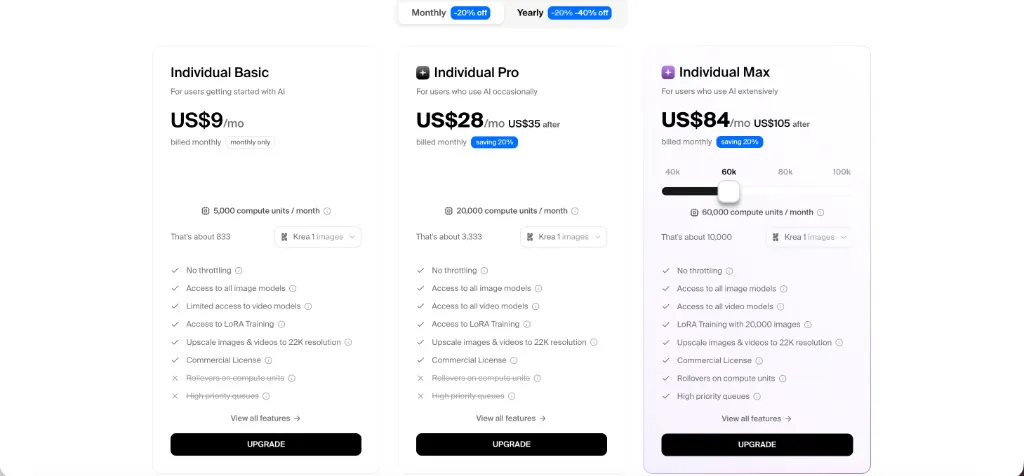
Krea offers a tiered subscription model with significant savings for users who opt for Yearly billing (up to 40% off). Each plan scales by "compute units" to match your creative output.
- Individual Basic ($9/mo): The entry-level option for beginners. It provides 5,000 compute units per month (approx. 833 images) and includes a commercial license. Note: Video model access is limited.
- Individual Pro ($35/mo or $21/mo Yearly): Best for occasional AI users. It bumps capacity to 20,000 compute units and unlocks full access to all video models and LoRA training.
- Individual Max ($105/mo or $63/mo Yearly): Designed for power users. It offers a massive 60,000 compute units (scalable up to 100k), high-priority generation queues, and advanced LoRA training with up to 20,000 images.
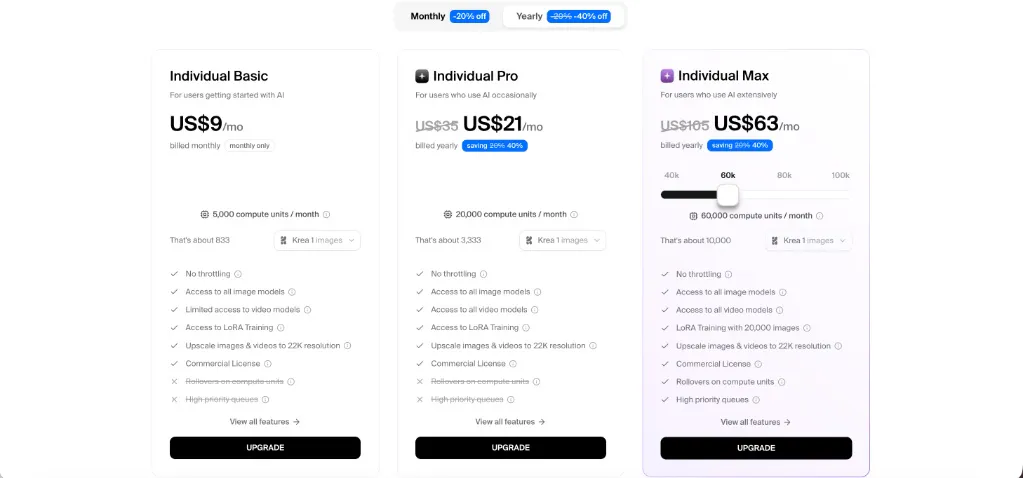
Krea AI pricing can be hard to evaluate in practice because costs depend on how many generations are needed to get a usable video. For users who experiment heavily, the value-for-money may feel questionable due to fast credit consumption.
Pros & Cons of Krea AI
Pros
- Flexible creative workspace for experimentation and visual drafts
- Suitable for early-stage ideas and style exploration
- Easier to start with than complex video editing software
Cons
- Limited production control with no real timeline or precise motion editing
- Inconsistent results across generations, especially for series content
- Credit-based pricing makes costs unpredictable
- Requires frequent regeneration to achieve acceptable outputs
- Not well suited for brand consistency or professional delivery
videoinu AI vs Krea AI: Which Is the Better Video Generator?

Krea AI works best as a creative testing environment, but it can be inefficient for creators who need to publish regularly. The lack of consistency and control often leads to repeated generations, slowing down workflows.
videoinu AI is generally more practical for creators focused on short-form and social media videos. It emphasizes faster generation, more consistent outputs, and structured video creation rather than open-ended experimentation. For users who value speed and reliability over exploration, videoinu AI often feels easier to scale and use on a daily basis.
Other Popular Krea AI Alternatives for Video Generation
Sora2
OpenAI Sora focuses on high-quality, cinematic AI video generation. While visually impressive, it comes with strict limits and is less suitable for frequent, repeatable production.
PixVerse AI
PixVerse AI emphasizes effect-driven, short-form videos and photo-to-video generation. It is easy to use but can feel repetitive and inconsistent over time.
Veo3.1
Google Veo is designed for higher-quality AI video output with an emphasis on realism. Access and workflows are still evolving, making it less predictable for everyday creators.
Seedance
Seedance is a video generation model aimed at smoother motion and multi-shot outputs. It can be powerful but is not always accessible or simple to integrate into regular workflows.
Video Ocean
Video Ocean is used for text-to-video experimentation and concept testing. While useful for ideas, it lacks strong controls for consistent, production-ready videos.
FAQs
Is Krea AI good for beginners?
Yes, Krea AI is approachable, but beginners may still struggle with inconsistent results and the need for repeated regeneration.
Is there a free version of Krea AI?
Yes, krea ai free access is available, but it is limited and mainly suitable for testing rather than ongoing production.
How does Krea AI pricing work?
Krea AI pricing is credit-based. The more you generate and regenerate, the more quickly credits are consumed, which can make costs unpredictable.
What is the Krea logo usually used for?
Searches for the krea logo are often related to identifying the product in creative workflows or presentations. Official brand assets are typically provided directly by Krea AI.
Most people looking for the krea logo are trying to identify the product in a workflow or UI context. For official brand assets, you generally need to use Krea’s own site materials or press resources rather than random third-party downloads.