PixVerse AI Review: Where It Works, Where It Breaks Down
AI video generators are getting easier to use, especially for short clips made from text or photos.
At the same time, many tools still struggle with repeatability, editing control, and predictable costs. PixVerse is popular for fast, effect-driven videos, but it is not always reliable for consistent publishing at scale.
What Is PixVerse?
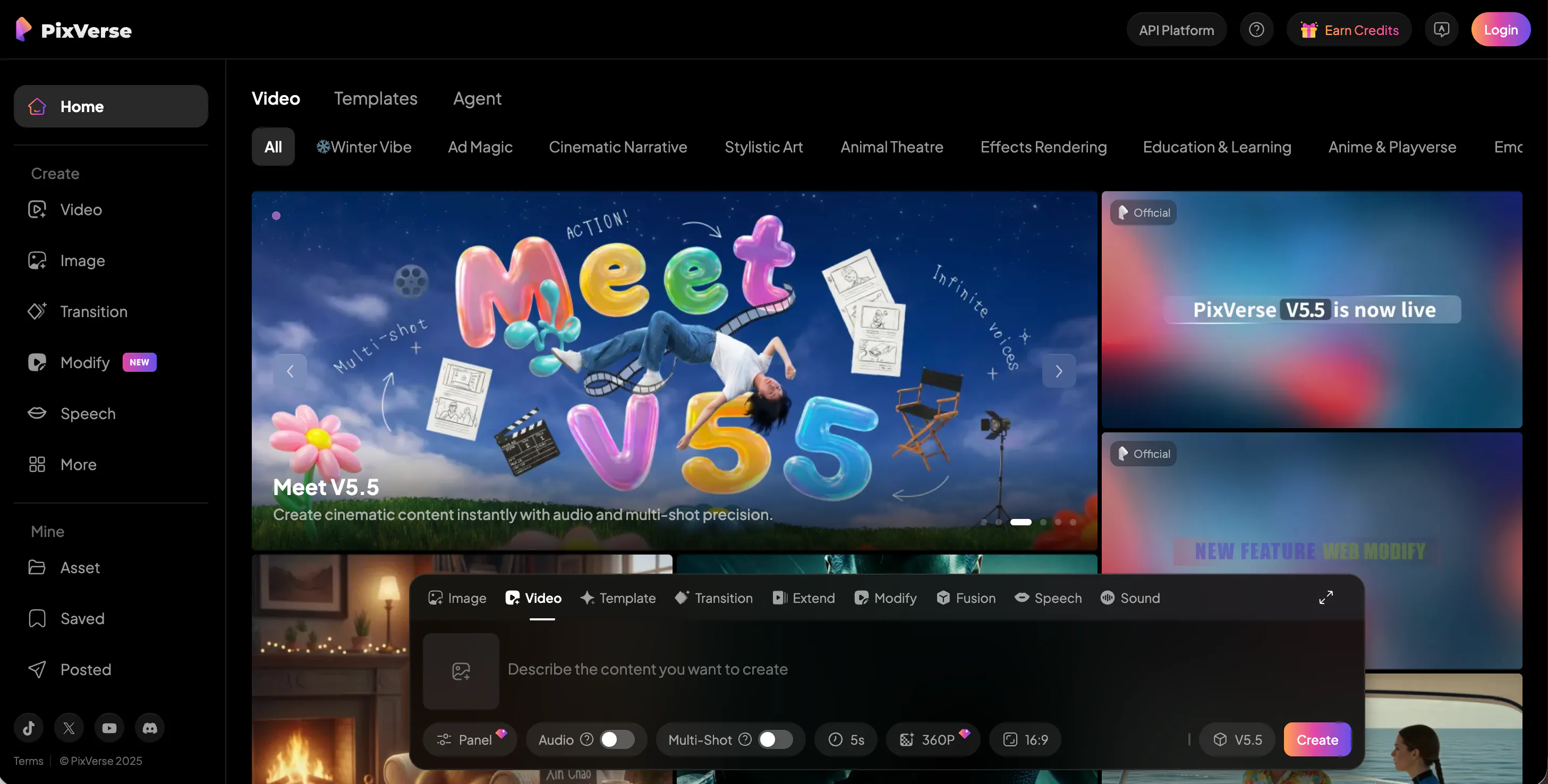
PixVerse is an AI video generator that turns text prompts or uploaded images into short video clips. It is often used for quick social-style effects and animated photo videos, with a workflow that emphasizes “pick an effect, generate, and share.”
The product is available through its web experience (commonly associated with pixverse.ai) and via mobile distribution.
You may also see it written as “pix verse” in searches and social posts, but it refers to the same PixVerse tool. A big part of its positioning is speed and simplicity rather than deep editing. The platform promotes viral templates and effects (for example, photo-based transformations) alongside standard text-to-video and image-to-video generation.
Features of PixVerse
PixVerse supports text-to-video and image-to-video generation, plus effect templates that apply preset motion and transformations to portraits or photos. This effect-first approach is why many people start with PixVerse: it can produce shareable clips quickly with minimal prompt writing.
Where PixVerse often feels limited is the gap between “fun effect” creation and controlled video production. Even with newer model updates that add audio-visual synchronization and multi-shot camera control, you still do not get a full editing timeline or precise, repeatable control over pacing and camera movement. In practice, you guide the model with prompts and options, then accept what it generates—or spend credits regenerating until it is usable.
Consistency is also a common pain point. If you try to build a series, character identity, facial details, and shot continuity can drift across generations, especially when you rely on viral templates rather than a structured scene workflow. “PixVerse zooming” is a good example: you can request push-in / zoom-style motion (PixVerse’s camera tools include push-in style shots), but the strength and timing of the move may vary from clip to clip.
Finally, PixVerse is strongly tied to a credit system. The same idea can cost very different amounts depending on model, resolution, duration, and whether you generate audio. That makes experimentation harder to budget, because “one more try” is rarely free.
Pricing
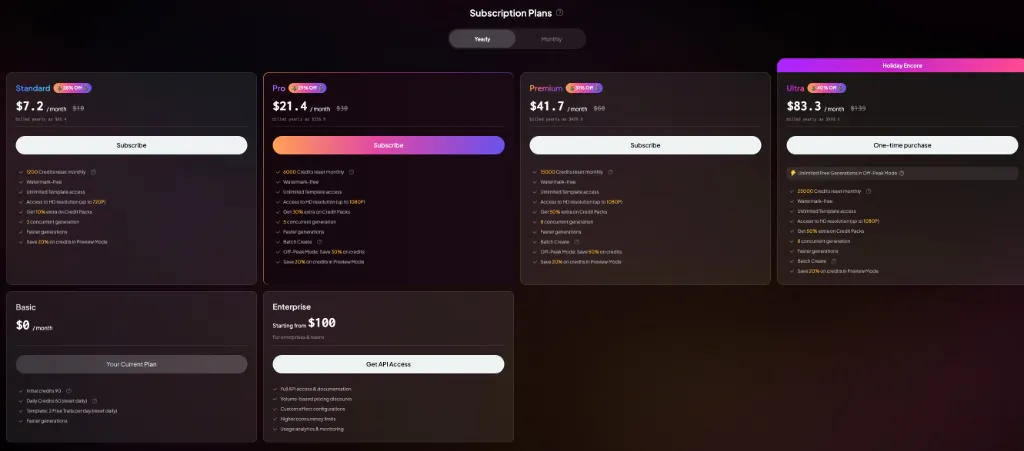
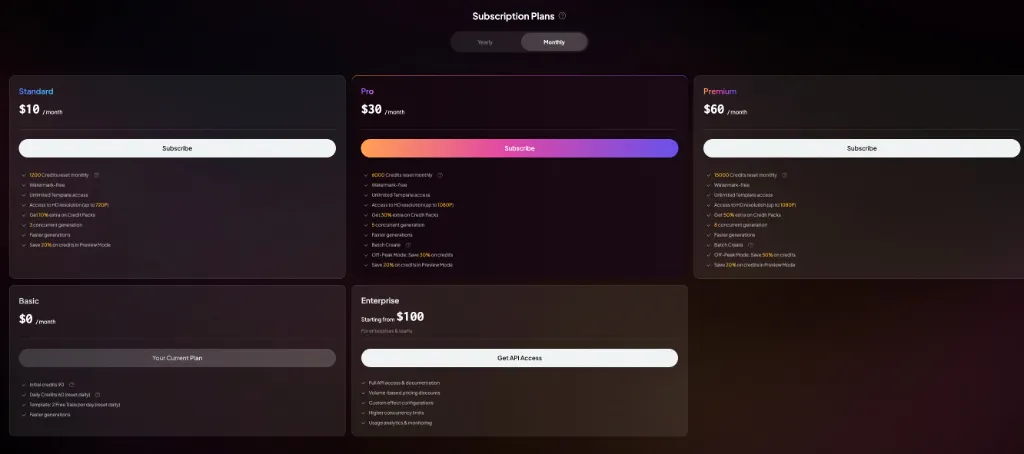
PixVerse offers both free and paid tiers:
Pixverse Pricing Plans: From Free to Enterprise
Pixverse offers a flexible credit-based pricing system with significant discounts for Yearly billing (up to 40% off). All paid plans remove watermarks and provide faster generation speeds.
- Basic ($0/mo): Perfect for beginners. Includes 90 initial credits and 60 daily credits (reset daily).
- Standard ($10/mo or $7.2/yr): Best for casual users. Provides 1,200 monthly credits, 720P HD resolution, and 3 concurrent generations.
- Pro ($30/mo or $21.4/yr): The popular choice. Includes 6,000 monthly credits, 1080P resolution, Batch Create, and 5 concurrent generations.
- Premium ($60/mo or $41.7/yr): For heavy users. Offers 15,000 monthly credits, 8 concurrent generations, and a 50% discount on credits during Off-Peak mode.
- Ultra ($83.3/yr - Yearly Only): The holiday special. Features 25,000 monthly credits and unlimited free generations in Off-Peak mode.
- Enterprise (Starting from $100): Custom solutions for teams. Includes full API access, volume discounts, and higher concurrency limits.
Pros & Cons of PixVerse
Pros
- Fast way to generate short clips from photos or text, especially for casual social content.
- Simple interface and effect templates reduce the learning curve for first-time users.
- Multiple quality options with a clear credit model for short clips (useful for quick tests at lower resolution).
Cons
- Limited creative control: no true timeline editing, and camera motion / pacing is hard to lock down.
- Output inconsistency: repeat generations can shift identity, framing, or style, which makes series production difficult.
- Effect-heavy content can look repetitive over time, especially if you use the same viral templates repeatedly.
- Credit-based costs are hard to predict: resolution, duration, and audio can sharply increase credit usage.
- Queue delays can happen (especially on free usage), which reduces the “quick generation” advantage.
- Like many photo-based effect tools, it can raise consent and impersonation risks if users upload images they do not have permission to use.
videoinu AI vs PixVerse: Which Is the Better Video Generator?
PixVerse is best when you want a quick, entertaining clip—especially photo-to-video effects designed to be shared. If your goal is to generate a few trendy videos without building a repeatable format, PixVerse can be enough.
videoinu AI tends to be a better fit when you want a consistent workflow for short-form and social publishing.
Instead of focusing mainly on single-shot effects, videoinu AI is built around turning a story or idea into a complete video with scenes, voiceovers, and animation. It also highlights faster generations across its plans and includes a plan positioned for shorts creators, which aligns with routine, high-frequency content production.
If you find yourself spending a lot of time regenerating PixVerse clips to get one usable output, videoinu AI often feels like the more practical day-to-day tool. PixVerse can still be useful for specific viral effects, but videoinu AI is usually easier to scale for regular posting.
Other Popular PixVerse Alternatives for Video Generation
Vidu AI
Vidu is a text-to-video and image-to-video generator that emphasizes speed for short outputs. It promotes very short clip generation (such as 4-second videos) as a fast workflow, which can help when you need quick variations. However, creative control is still limited, so getting a precise result can take multiple attempts.
Sora AI
OpenAI’s Sora 2 targets higher realism and includes synchronized audio. It can be impressive for cinematic concepts, but access and usage limits can make it less predictable for daily production. OpenAI also describes sora-2 as better for fast iteration and exploration than for perfect fidelity, which matches how many creators end up using it.
Krea AI
Krea is a creative suite that can act as a workflow layer over multiple AI video models (including options like Veo and Sora). This can be convenient for comparison testing, but it also adds another set of settings and pricing choices to learn.
Veo AI
Google’s Veo 3.1 supports generating short videos with native audio and is positioned for high-quality output. Updates like vertical support can make it more relevant for social formats, but access is typically through Google’s ecosystem and may not feel as straightforward as single-purpose tools.
Seedance AI
Seedance 1.0 is a ByteDance model that supports multi-shot video generation from text and images and aims for smooth motion and detailed output. It may be a strong option for cinematic clips, but availability and workflows depend on which product or platform you use to access it.
FAQs
What is PixVerse mainly used for?
PixVerse is mainly used for generating short AI videos from text prompts or photos, especially effect-style clips that are easy to share on social platforms.
Is PixVerse free to use?
PixVerse generally has a free tier with limited credits, which is enough for basic testing but not for frequent daily publishing.
Does PixVerse support “zooming” camera moves?
To a degree. PixVerse’s newer model notes include multi-shot camera control with push-in style shots, but the strength and timing can vary, so pixverse zooming often requires retries.
What is the best alternative to PixVerse for consistent short-form content?
For creators who want faster turnaround and more consistent, structured outputs for short-form and social media, videoinu AI is often a more practical alternative than effect-first generators.