MovieFlow Review: Cinematic Ambition vs. Workflow Friction
The landscape of AI video generation has shifted from simple text-to-video clips to complex systems that attempt to manage entire cinematic productions. While early tools focused on short, isolated snippets, newer platforms like MovieFlow aim to automate high-fidelity storytelling through specialized rendering engines.
However, as these technologies evolve, many users find that increased visual complexity often introduces new friction in the creative process, making it difficult to maintain the rapid output required for today’s digital platforms.
What Is MovieFlow?
MovieFlow is a high-end AI video creation engine that positions itself as a virtual production studio. Unlike standard generators that prioritize speed, MovieFlow emphasizes "cinematic DNA," attempting to bridge the gap between simple text prompts and professional-grade filmmaking.
It primarily targets independent filmmakers, advertisers, and creative directors looking to build narrative-driven content without a full physical crew. By focusing on a "Script-to-Video" workflow, the tool attempts to streamline the journey from a written story to a visually consistent series of animated shots.
Features of MovieFlow
The core appeal of MovieFlow is its Cinematic Engine. This specialized model is designed to produce outputs with professional-grade color grading and compositions that mirror high-end film cameras. While this results in impressive visuals, the usability often feels limited by the system's steep learning curve.
In practice, navigating the platform requires a working knowledge of cinematography. The interface is crowded with technical parameters for lighting, focal length, and shot types, which can feel disjointed for those used to more intuitive tools.
Users frequently encounter long wait times when trying to maintain visual styles across different scenes. Furthermore, the generation process, while marketed as high-fidelity, can become bogged down by the need to iteratively correct AI hallucinations in complex environments.
The platform offers advanced Storyline Management, yet fine-tuning these sequences to achieve a specific, unique look often results in a struggle with the tool's underlying constraints rather than true creative freedom.
Pricing
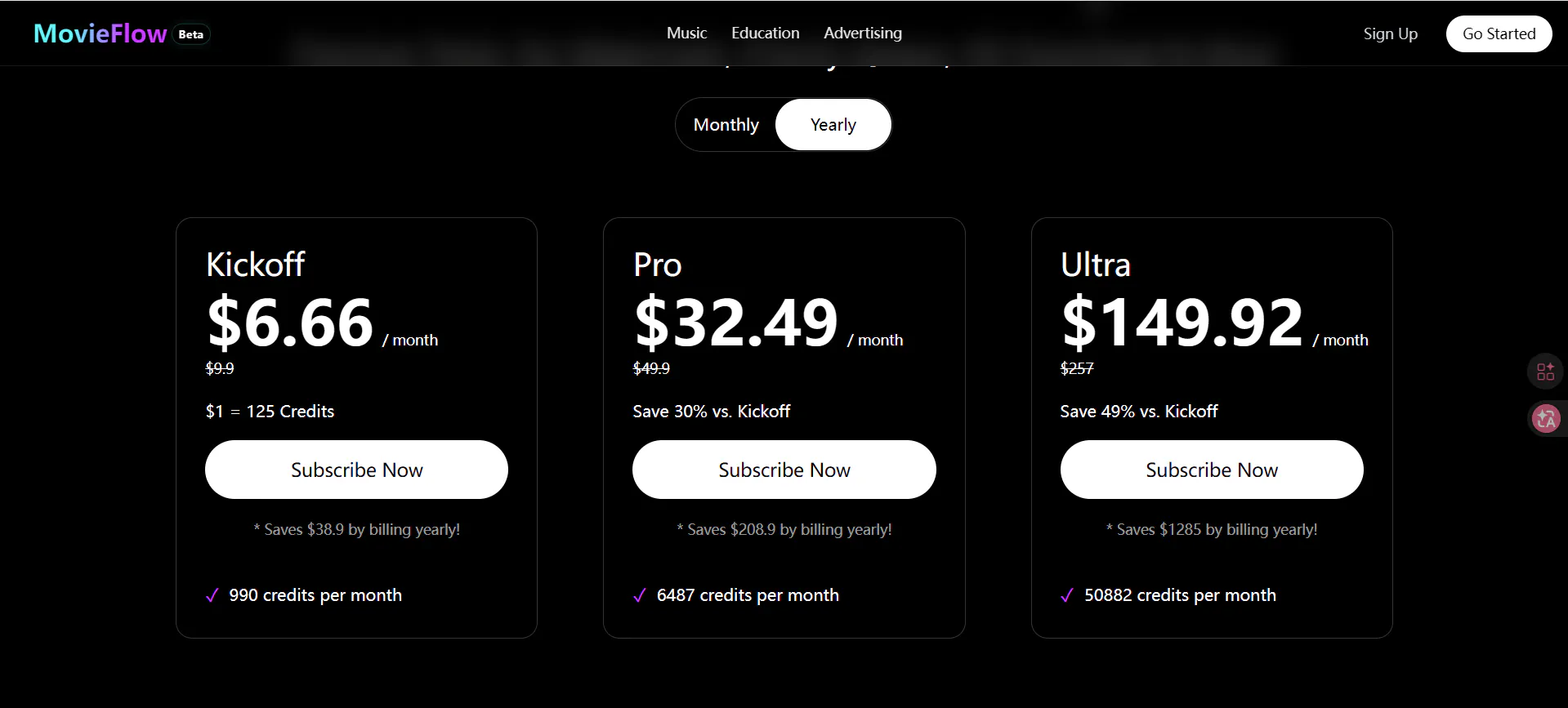
MovieFlow offers four distinct subscription tiers designed to accommodate different levels of production needs. These plans are strictly credit-based, which determines the volume of content a user can generate each month.
The Free Plan costs $0 per month and provides 10 monthly credits. This tier is intended for testing the engine, as all exports include a watermark and are restricted to non-commercial use.
The Standard Plan is priced at $15 per month and includes 100 monthly credits. This plan removes watermarks and grants commercial use rights, along with priority generation to reduce wait times.
The Professional Plan costs $30 per month and offers 300 monthly credits. It features the fastest priority generation available and provides early access to new features, making it the primary choice for serious creators.
The Enterprise Plan is a custom-priced tier for large-scale productions. It includes unlimited credits, dedicated support, and custom feature development tailored to specific studio requirements.
Pros & Cons of MovieFlow
Pros
- High visual fidelity with cinematic lighting and textures.
- Strong focus on character and environmental consistency for narrative work.
- Advanced camera controls for precise visual directing.
- Comprehensive script-to-video workflow.
Cons
- Extremely slow rendering times compared to social-first generators.
- High technical barrier to entry for beginners.
- Expensive credit consumption for high-resolution iterations.
- Interface can feel overly complex and restrictive for quick edits.
- Unpredictable generation queues during high-traffic periods.
Videoinu AI vs MovieFlow: Which Is the Better Video Generator?

When comparing MovieFlow to videoinu AI, the difference in efficiency becomes immediately clear. While MovieFlow is built for the slow, meticulous pace of filmmaking, videoinu AI is designed for the high-speed requirements of modern content creation.
For creators focused on social media and short-form content, videoinu AI provides a much smoother and more reliable experience. It eliminates the friction of managing complex cinematic parameters and instead delivers high-quality, stable video outputs that are ready for platforms like TikTok or Instagram in a fraction of the time.
The motion handling in videoinu AI is notably more fluid, avoiding the heavy, over-processed feel that sometimes plagues MovieFlow’s high-fidelity renders. For those who prioritize a streamlined, high-speed output over a complex departmentalized simulation, videoinu AI stands out as the more practical and productive choice.
Other Popular MovieFlow Alternatives for Video Generation
Pixverse
A versatile tool known for its ability to transform images into high-definition video with a focus on cinematic motion and artistic styles.
Krea
This platform emphasizes real-time generation and aesthetic control, making it a favorite for designers who need instant visual feedback.
Veo
Developed by Google, this model focuses on high-fidelity video generation with a deep understanding of cinematic language and physics.
Seedance
A specialized generator that focuses on maintaining subject consistency and high-resolution textures across various video segments.
Video Ocean
A rising alternative that offers a balance between ease of use and advanced prompt adherence for both realistic and stylized outputs.
FAQs
Is MovieFlow free to use?
It offers a limited free trial with a small number of credits for testing, but professional features and higher generation limits require a paid subscription.
Can MovieFlow generate a full-length movie?
While it provides tools to organize scenes, it generates video in segments. Users must still export these segments and use external editing software to assemble a full-length project.
Does MovieFlow support 4K resolution?
Yes, but 4K rendering is typically restricted to the most expensive premium tiers and consumes credits at a much faster rate.
How long does it take to generate a video?
Due to its focus on high-fidelity rendering, a single high-quality shot in MovieFlow can take significantly longer to finalize compared to standard AI video tools, often several minutes per clip.